How to Build Account Scoring Model for Outbound
A practical playbook to unify Sales and Marketing around transparent, AI-driven account prioritization.
Playbook Overview
When should you run this playbook?
This playbook shows you how to use UserGems’ AI Account & Contact Scoring to rebuild your outbound model from the ground up - with full transparency, Sales and Marketing alignment, and a scoring system that learns and improves over time.
Who to target?
Playbook goal?
Responsible teams?
How UserGems AI Scoring Works
UserGems Account & Contact Scoring is a custom AI-powered model built from your own CRM data and signals. It doesn’t use generic industry templates. It analyzes the accounts and buyers that represent your best customers, then scores every account in your universe against that profile so you can prioritize the ones most likely to convert.
Step 1: Start with Your Blueprint
The model begins with a “blueprint”—a CRM report or list you choose as your baseline. This could be your closed-won customers, your best expansion accounts, or even a target list of enterprise dream accounts. You’re telling the system: “These are the types of companies we win. Find me more like them.”
When you create this Ideal Customer Profile (ICP) in the UserGems platform, the AI automatically scans the accounts on your list and identifies what makes them similar. Not just basic firmographics like industry and company size; it looks across 600+ attributes, including technographic data, hiring patterns, company signals, and more. It then uses this data to intelligently score each attribute in your model, so from day one, you have a custom-scored model built around your ICP - not a generic one.
Step 2: Two Layers of Scoring
UserGems scores at two levels, then combines them for a holistic account view:
Company Score
The company-level score is built from two components:
- Company Similarity measures how closely an account’s attributes match your best customers—think firmographic fit across industry, employee count, tech stack, and geography.
- Company Signals capture what’s happening at that company right now that makes them a strong fit: past champions at the account, funding rounds, product announcements, hiring spikes, competitive activity, and intent signals.
Contact Score
Similarly, the contact-level score combines:
- Prospect Similarity (how well a person’s role and seniority match your target persona) with
- Prospect Signals (recent events like a job change, promotion, or engagement activity that make it a good time to reach out).
The Account Score Formula
Account Tier = Company Total Score + Highest Prospect Score
This formula matters because a perfect-fit company with nobody worth reaching out to is a dead end. And conversely, a great prospect at a poor-fit company won’t convert. Both sides need to be strong.
Step 3: Normalized Grades (A through D)
Raw scores are normalized to a 0–100 scale, and the average across all your accounts becomes the baseline for a “B” grade. Tiers are then assigned based on how far above or below that average each account falls:

How UserGems Gets Closer to Causation
One of the most powerful aspects of UserGems’ scoring model is the ratio data available for Company Similarity attributes.
For each attribute (like a specific tech stack tool, industry vertical, or employee count range), the model surfaces two data points:
- Customer prevalence: What percentage of your customers (from your blueprint list) also have this attribute.
- Likelihood ratio: How many times more likely your customers are to have this attribute compared to non-customers that otherwise match your ICP.
For example:
If a Company Similarity attribute shows “Customers with this Factor: 22% | Ratio to non-Customers: 6x,” it means 22% of your customers have this attribute, and they are 6 times more likely to have it than non-customers.
A higher ratio is a stronger predictor. The closer this gets to identifying causation rather than just correlation.

Building Your Account Scoring Model: A Step-by-Step Playbook
Here’s how to use UserGems AI Scoring to build a unified scoring model that both Sales and Marketing believe in.
Phase 1: Set the Foundation (Week 1)
1. Choose Your Blueprint
Decide which CRM report will serve as the baseline for your scoring model.
Common options:
- Closed-Won Opportunities (most common)—builds the model from companies that have already converted.
- Current Customers —if your customer base is large and representative of your ideal.
- Target Enterprise List —if you’re moving upmarket and want to model against aspirational accounts.
- Specific Segment or Vertical —if you want to create separate ICPs for different segments (you can have multiple).
2. Create Your ICP in UserGems
Navigate to ICP & Scoring in the platform -> select your blueprint report -> let the AI scan your accounts.
Within 24 hours, the AI Scoring tab will populate with a custom model and your target accounts will be scored from A to D.
3. Bring Sales Into the Room

Schedule a working session with marketing and sales leadership to review the initial model together. Walk through the top-rated accounts. Ask: “Does this look right? Are the right accounts at the top?”
This is where the transparency of UserGems’ model pays off. You’re not showing a black-box score. You’re showing both teams exactly which signals and attributes are driving each account’s rank, and inviting the two teams to collaborate and align on changes in Phase 2.
Phase 2: Refine the Model Together (Weeks 2–3)
1. Review the Top-Rated Accounts
Pull up the Top Rated Accounts tab. Look at the top 30–50 accounts. For each one, check: Does the grade feel right? Are unexpected accounts showing up at the top? Are accounts you know are great ranked too low?
2. Adjust Attribute Weights
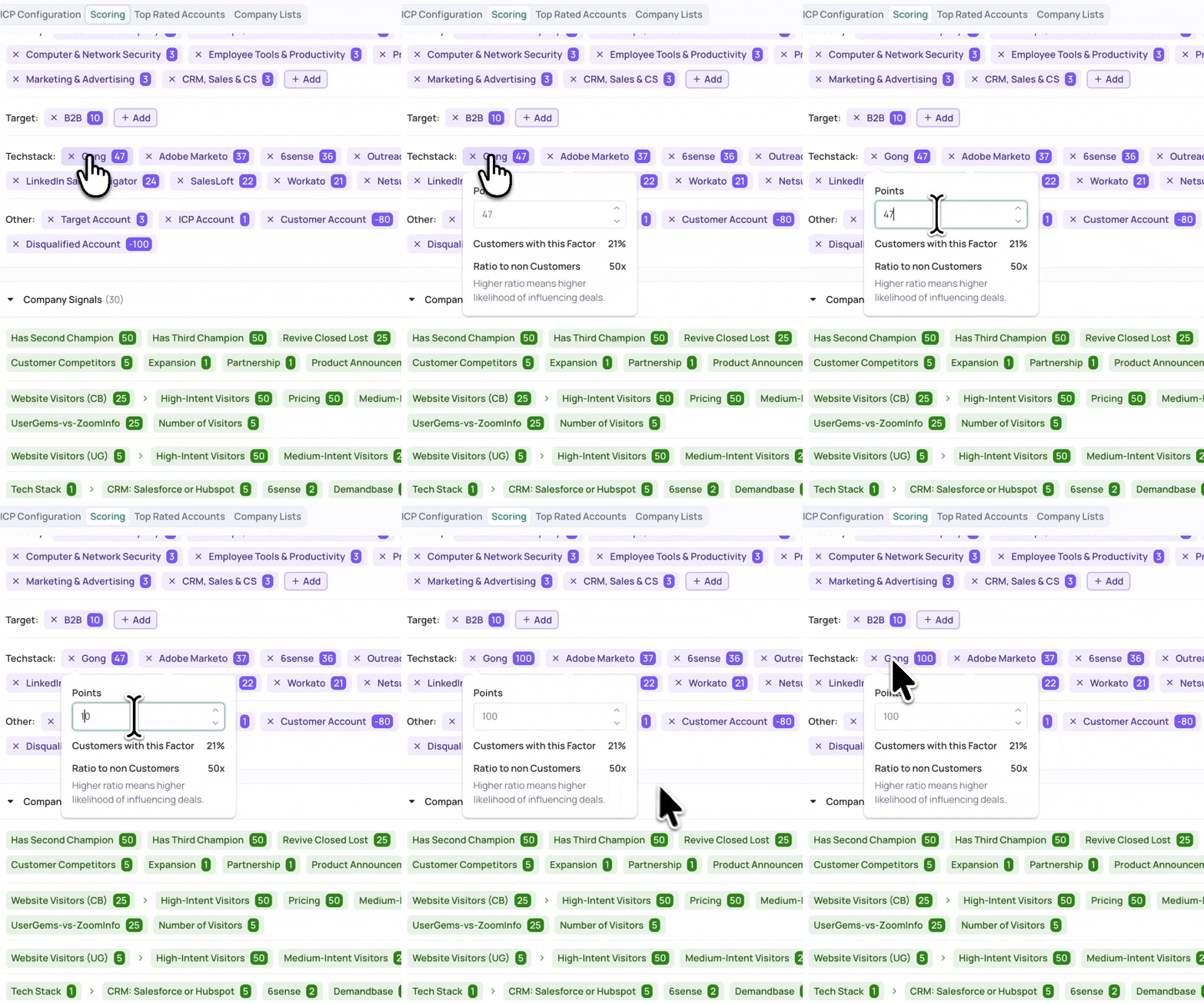
Click any attribute to adjust its value from −100 to +100 (where 0 means no impact). As you make changes, the Company Scoring panel on the right updates in real time, so you can immediately see how your edits shift the rankings.
This is the step where Sales and Marketing should work together. If your sales team knows that companies using a certain competitor tool tend to close faster, bump that attribute’s weight up. If an industry vertical feels overweighted, dial it down. Every change is visible and explainable.
3. Use Review Accounts to Train the Model
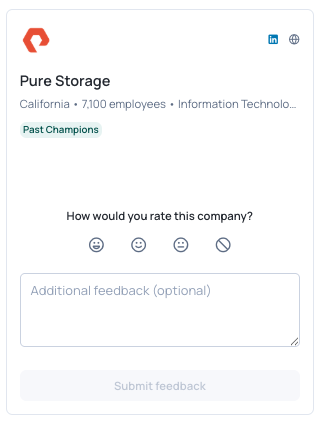
Once your attribute weights feel right, use the Review Accounts feature (thumps up or down) to provide human feedback. Rate at least a dozen or more accounts (thumbs up for strong fits, thumbs down for poor fits) to help the model learn from your judgment over time. This doesn’t change scores immediately—it gradually trains the model to better reflect your team’s priorities.
Phase 3: Operationalize the Tiers (Weeks 3–4)
Once your team agrees the A/B/C/D tiers reflect reality, you can build your unified account model around them.
Here’s a general framework:

This framework unifies your team around a shared language for account prioritization. When Sales and Marketing both understand what an “A” account means and what plays run against “B” accounts, the debates about “who should we be targeting” are replaced with clear, data-backed operating rhythms.
Phase 4: Discover Net-New Accounts
Once your scoring model is dialed in, use it to proactively discover high-fit accounts you haven’t engaged yet. In UserGems, navigate to Settings → Track Companies, select Auto Import, and choose the ICP you configured. The system will create a tracked list of high-fit companies that aren’t yet in your CRM—automatically expanding your Total Addressable Market with accounts that match the profile of your best customers.
Quick-Start Checklist
- Choose your blueprint report (Closed-Won, Customers, or Target Accounts)
- Create your ICP in UserGems (ICP & Scoring tab)
- Wait 24 hours for the AI to generate your custom scoring model
- Bring Sales leadership in to review the Top Rated Accounts together
- Adjust attribute weights collaboratively, reviewing the real-time impact on rankings
- Rate 12+ accounts using Review Accounts to train the model
- Assign tier-based motions (A = high-touch, B = marketing-led, C/D = low-touch)
- Auto-import net-new accounts to expand your TAM
- Iterate: review rankings monthly, adjust weights as your business evolves
What Comes Next: Buying Stages
Once your unified account model is running and your team has confidence in the A/B/C/D tiers, the natural next step is layering on Buying Stages - UserGems’ Intelligence Agent feature that maps every account to a stage in the buying journey (Unengaged, Awareness, Interest, Consideration, Decision).
This is where the model gets even more powerful. Buying Stages answers the question: “Of all my B-tier accounts, how many are actually showing signs of being in-market?” If only a handful of your B accounts are in the Consideration or Decision stages, that tells you the team needs to run more programs to generate engagement signals. If a bunch are in later stages, you know exactly where to focus outbound resources for the highest-impact conversations.
We’ll cover Buying Stages implementation in a separate playbook, but getting your scoring model right first is the foundation everything else builds on.
About the Author

Want to see more playbooks?
-min.svg)
Signal-Based Outbound & ABM in Europe

How to Boost Your AI Outbound Reply Rates
.png)
How to Use AI for Event Outreach