You've set up an outbound strategy in your company. But you’re wondering when it’s the right time to contact your leads or how you can improve conversion.
Outbound strategies based solely on ICP segmentation typically show low contact-to-opportunity conversion rates, even with strong firmographic and psychographic targeting.
Signal-based programs solve this by showing you when prospects are ready to buy.
Often, these sales signal-based strategies (built on buying signals like the job change signal or fundraising signal) offer a higher reply rate and conversion rate as they let you know when your prospect is in need of your product or service and is ready to buy it. Timing drives conversion. Reach accounts when they're ready to buy, and your conversion rates improve significantly.
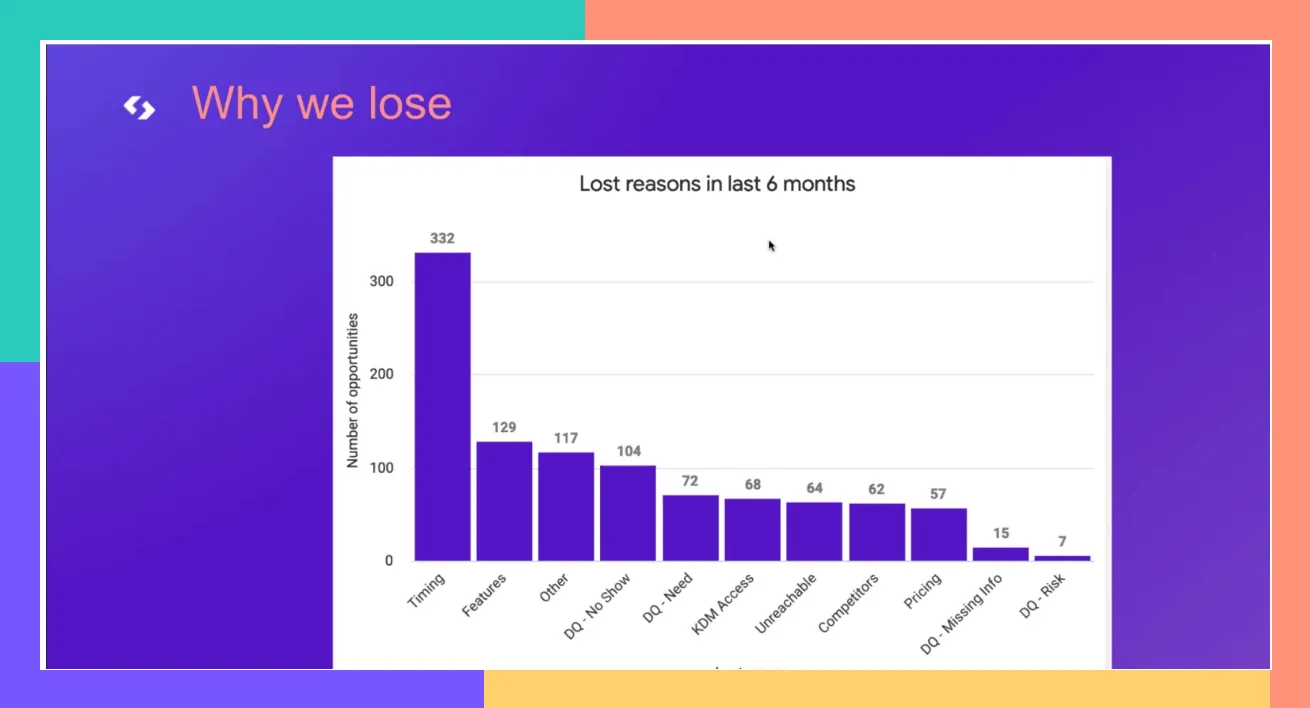
Actually, during my time at Spendesk, the timing was among the top lost reasons in our CRM. If you can calibrate the good time to reach an account, you start with an unfair advantage and a better chance to convert your prospect.
The “new hire” buying signal lets you engage with your prospect when they’ve just joined a new company. It’s an interesting momentum to leverage. And the earlier you engage with the prospect, the more you increase the odds of converting them.
Indeed, according to Forrester, being in front of the buyers first increases your chance of closing the deal by 74%.
Talking about statistics, I would like to focus on two other ones before diving into the new hire process.
Every year, 30% of people change their jobs.
New buyers spend 70% of their budget in the first 100 days.
So, the question now is, why should you pay attention to B2B buying signals?
What are the key benefits of leveraging B2B buying signals?
Tailoring a dedicated cadence according to the new hire signal increases your chances of resonating with your buyer pains & needs. Additional main benefits include:

1. ⚙️ Automated way to source new leads
As the logic behind intent is to identify sales-friendly moments to engage with a prospect, it helps you automate demand generation and populate fresh new accounts into your CRM.
Of course, beyond focusing on tracking the new position of your target persona (the buyer), you also narrow down your ideal account profile (the core firmographic attribute: Post Series A companies, the tech industry, etc.).
2. 🌟 Re-activate closed lost accounts in your CRM
It often happens in B2B sales. You did everything to entice a prospect (great lead research, personalization, a killer sales demo). But finally, it ends up in your CRM with the sad “closed lost” status.
Close-lost deals often convert 3+ months later when circumstances change. New hire signals create that opening. A Closed-Lost deal can typically be reactivated 3 months later after your first attempt. Repeating the same approach with the same stakeholder rarely works. The new hire signal gives you a fresh angle and a new decision-maker to engage.
The new hire buying signal offers this beautiful advantage. It gives you a new angle to work on. And a new stakeholder to talk with. An opportunity to engage with your targeted account again.
Remember, persistence often pays off in sales.
3. 📩 Add context & personalization with outreach
I have often been using a Salesloft study on best practices, relying on the analysis of hundreds of millions of interactions to create recommendations based on real data.
One of them was the fact that 20% personalization could bring up to 2X in reply rate.

Data from a Salesloft study.
And I have been able to observe it on my side as well. However, you don’t want to ask your sales reps to spend too much time doing personalization. The goal is to find the right balance between lead research and ROI.
Intent signals provide the context you need to personalize outreach at scale using this playbook (courtesy of the team at UserGems):
For the new hire sales motion, the icebreaker could be, “Hey {{firstname}} - congrats on your new role! I'm sure you'll make waves at {current company} as you did at {previous company}”).

Data in Salesloft from a company I worked with.
4. ⚡Higher conversion rate & engagement rate
As a consequence of the context & personalization layer we just talked about, intent helps you make a relevant sales pitch before your competitors. This may result in better resonance for your prospects. And by extension, better engagement & conversion rates.
It may also speed up the sales cycle.
5. 💰 Predictable revenue
One last thing. After launching some intents workflows, you should be able to evaluate the volume you can expect from each intent, the related conversion rate, and so the number of opportunities you can bring each month.

💡In summary, the goal is to empower Sales by creating an automated engine from lead sourcing to lead allocation. One that offers a predictable lead volume and converts above the average.
Going in-depth on “new hire” buying signal
First, how to POC (Proof of Concept) the "new hire" sales signal
If a company hires a new executive that is your key decision maker (VP or C-level) or at least among the persona you’re selling to, you can interpret it in two ways.

First, the new hire may be looking for ways to make an impact quickly, so they will be more open to new solutions (hint: remember the statistics on new buyers spending their budget in the first 100 days). New hires want to make an impact quickly, which puts them in an explorative mindset with budget to spend.
Secondly, when a new executive is hired, it may also mean the company is looking to implement major changes. That means budgets are allocated for the new executive to make these changes happen. And happen quickly.
If you reach out to them at the right time with the right message to stay top of mind, they'll be far more inclined to evaluate compared to your average leads.
How to track this signal
If you’re following Paul Graham's mindset and want to “do things that don’t scale,” at least at first, you could start with a minimal viable test.
Extract your key decision makers from LinkedIn SalesNav that changed jobs in the last 90 days, manually clean & import the file into your outreach tool with a dedicated cadence based on the momentum, and then compare how this cohort performs compared to your classical outreach (Some manual work though).
Typically, you should expect an uplift in conversion rates as a result of a more tailored approach.
Here’s how to use LinkedIn Premium to see who has changed jobs in the last 90 days. Also, don’t forget to follow your contacts on LinkedIn to check if they’ve moved into new roles.

Salesnav screenshot
Once you’ve seen the result of this manual approach, and you want to do this repeatably, and at scale, UserGems is a great option to treat your buyer job changes as an always-on lead generation campaign, generating qualified pipeline in the process.
💡For outbound and ABM motions, a 14-touchpoint cadence typically works well, combining email, calls, and LinkedIn outreach to engage new hires across multiple channels.
For people wondering what was the “give to get” email, I consider that it is better to provide value by giving, for instance, the "The First 90 Day Checklist For {{your KDM}}" or inviting them to our community before being really in prospecting mode. Leading with value before asking for a meeting typically improves response rates.

How to scale the “new position” sales motion
But once you have done your ad-hoc campaign and see the results, how can you scale your new position while making sure you exclude the prospects already assigned to a sales rep from your campaign? And also making sure you have great data for your multi-channel outreach.
Simply put, how can you clean & organize data in a way you could scale this intent?
The idea is to automate the entire process, from sourcing the data to sales allocation. And automatically push them in the appropriate cadence. As well as push the intent into your final outreach tool.
Extract Leads from Source ⇒ Model your data (enrich, clean, synchronize & allocate) ⇒ Engage.
After implementing your first intent, you would like to repeat the process for other business-friendly momentums: employee growth, fundraising, etc. Cargo automates this process, letting you define dedicated data models for each signal to ensure consistent datasets and reliable campaign orchestration.
To effectively scale the new position intent, you need to think about sales enablement & data modeling to stay consistent in terms of lead quality & routing.
First, for sales enablement, here are a few things (not exhaustive, it deserves a dedicated focus) you can think about:
Dedicated Slack channel per intent with a slack notification (@Max) to the specific sales rep for each new account + alert by email + CRM notification.
Implementing a custom object in your CRM to keep track of the different intents that happened for an account.
Custom Dashboard in your CRM for the sales to easily monitor & prioritize accounts with intent over the others (as you have better conversion probability on those accounts).
Create a specific cadence with dedicated messaging & assets for the intent - Of course, I don’t need to say that it’s much better if you test multiple variants for each step of your cadence as long as you have enough sample size.
Have a specific “Origin” attribute in your CRM set (origin = intent) to evaluate the performance of the intent after a few months.
Here, a tool like Cargo allows you to model your data — you can plug your data source, clean & normalize the data at scale, and finally route them according to how you want to engage with the leads.

Ready, Set, Track
Pipeline goals remain aggressive even as budgets tighten, which means sales and marketing teams need efficient sources of qualified pipeline. For now. But aggressive pipeline goals mean it's reasonable to expect sales and marketing teams to keep foraging for new sources of pipeline.
If you're not tracking new hire signals yet, you're missing a reliable source of qualified pipeline with conversion rates that typically outperform standard outbound by 2-3x. Your PPC costs go up as you scale. And your SDRs can only spend so much time personalizing cold outreach.
The "new hire" sales signal guarantees you:
Ready-made personalization at scale
An automated source of qualified pipeline
Predictable revenue
And higher engagement rates on outbound campaigns
UserGems automates buyer movement tracking at scale, integrating directly with your existing revenue stack to deliver qualified pipeline without manual work.

.png)
.png)
.png)