Lead generation is a top marketing goal for most businesses. But no matter how much time and effort you invest in generating a qualified pipeline, it will all go to waste if you don’t follow up on those leads.
When you reach out makes all the difference — timing is a critical factor in sales. Stats have shown that 35-50% of businesses end up working with the first vendor that responds to them.
So how can you improve your email outreach return on investment (ROI) and achieve faster lead response rates? In this article, we’ll walk you through how UserGems can help you to get the most out of your outreach emails to win over potential customers and close more deals.
What is a lead response rate and why is it important?
Lead response rate, also known as lead response time, measures the average time it takes for your sales team to follow up with a lead who’s shown interest in your product.
With an average ROI of $45 for every $1 spent, email marketing is a top channel for outreach campaigns. It allows you to send personalized emails to your ICPs, nurture leads, and build relationships with prospects.
Despite the risk of leads going cold or missing a buy signal, the average lead response time from a sales team is a whopping 47 hours. In a 2017 survey by Drift, they also discovered that 55% of businesses took about five days to respond to leads — or not at all. Companies that respond to their leads on time gain a competitive edge.
New executives make buying decisions in their first 100 days. If you wait 47 hours to reach out, you've missed the window. UserGems alerts you the day someone changes jobs so you can be first in.
Common causes of low lead response rates and how we tackle these issues at UserGems
Cold outreaches, like emails or LinkedIn messages, typically have a low ROI because building trust with potential customers requires time. But your UserGems leads have a higher chance of converting because they know your business and likely had a great experience with your product in their former role.
When a past customer, prospect, or user (a Gem) is involved, you're 114% more likely to win the account. But if you’re not following up with these leads on time, you might not see that impact on your outreach ROI.
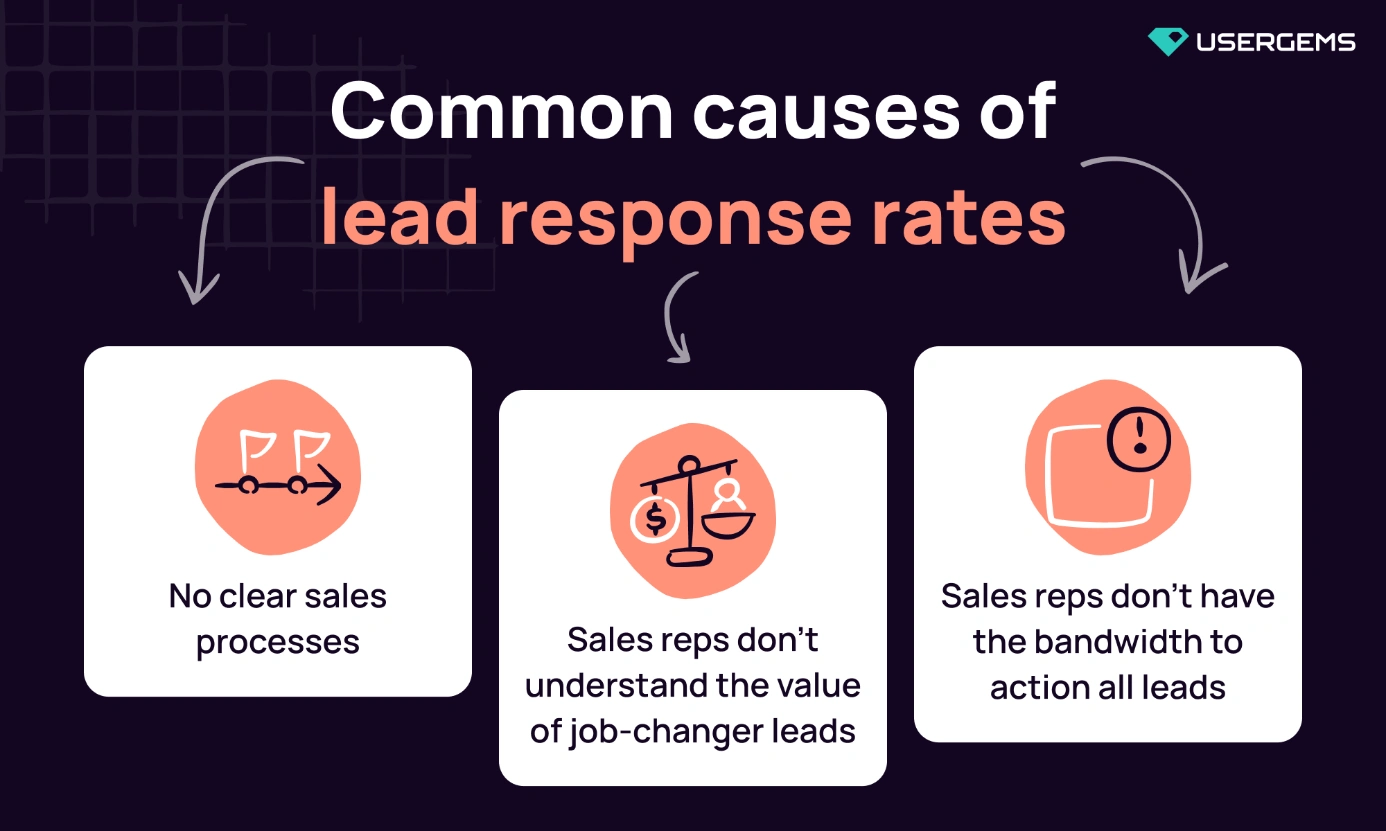
Here are some common reasons you have low lead response rates and how we solve them at UserGems.
1. Sales reps don’t have a clear process for accessing leads
Your reps have 50 leads in queue. Without a clear signal about who's ready to buy, they guess—or worse, they work the list top to bottom and miss the hot ones.
A clear process helps sales reps prioritize their outreach to UserGems leads, ensuring they make contact at the optimal time.
If you’re trying to quantify the impact, deals with UserGems leads are 54% bigger than deals without champions.
If you aren’t telling your sales reps which follow-up emails to send out first, you could be missing out on not just more deals, but bigger ones.
Give your team a clear process: check the UserGems report daily, action leads within 24 hours, use the automated sequences. That's how you close bigger deals.
How we do it:
Communicate a clear process of when, how, and where to access their UserGems leads. This is most commonly found in your CRM by directing them to the “View My UserGems” report. This is where sales reps can go to find all of the leads assigned to them.
If your team works through queues, it’s good to set an automated reminder to check for UserGems leads in their queues each day. It’s even better to assign a clear Service Level Agreement (SLA) to UserGems so the team knows how long they have to action the leads.
Setting up email and Slack notifications can also be helpful! UserGems sends out a weekly email each Monday to let your team know if they have un-actioned leads assigned to them.
2. Sales reps need more training on the value of the leads
Sales teams change. New reps join, old ones leave, and suddenly no one remembers why UserGems matters or how to use it.
A situation where there’s no one to drive product adoption internally could result in UserGems leads not being accessed or actioned for long periods of time. Show your reps the numbers: UserGems leads convert 114% faster and close 54% bigger deals. That's how you get buy-in.
As Claire Corriveau, Director of Demand Generation at Cobalt, explains, “Our BDRs focus on UserGems leads and are willing to work on it because they know the UserGems’ leads convert faster since they are familiar with our brand and helps them meet their target.”
How we do it:
Have regular training sessions with your enablement team to reinforce what UserGems is, who you’re tracking job changes for, and how to reach out to them.
Read through tips and tricks from other customers about how to personalize and action UserGems leads. Check out our UserGems’ Customer Stories for inspiration.
Schedule training sessions with your dedicated Customer Success Manager quarterly or bi-annually, depending on the changes within your own organization.
3. Sales reps don’t have the bandwidth to action all of their leads
Sales teams get can bogged down with too many leads. And while that should be a good thing, it’s sometimes overwhelming and hard to prioritize. Automating outreach campaigns ensures that your sales rep’s target list is being worked on in a timely manner.
“We passed the UserGems leads to all BDRs to manually follow up,” says Gar Smyth, VP of Revenue Marketing Operations at Mimecast.
“We then learned that some BDRs are more diligent at acting on these leads than others. That’s leaving opportunities on the table! Now we automate everything. Automate the follow-up. Automate everything. That's the lesson we learned. That was a tough lesson we learned.”
Wondering what was the result of automating follow-ups on their UserGems leads at Mimecast? 20X more meetings booked than other pipeline generation channels, generating $18M in new pipeline and unlocking their second highest converting channel.
How we do it:
At UserGems, we automate our outreach to UserGems leads and employ a multitude of playbooks to choose from to help us optimize our strategy for a variety of scenarios.
These playbooks contain everything needed for a successful email marketing campaign. Our reps get an email template and subject line personalized to their target audience — with all the work already done.
Here’s a snapshot of our UserGems sequences or UG4UG as we call it here, and our open rates:
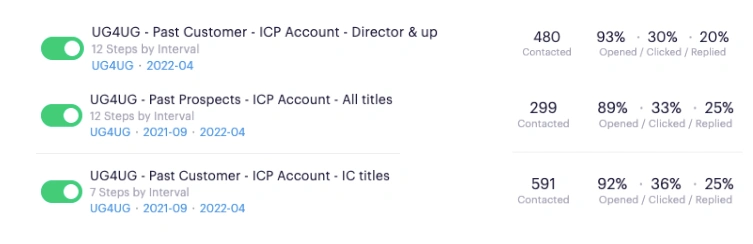
Automating these plays takes a huge burden off your sales team and drives better results and increased pipeline.
In addition, you have a higher chance of getting your leads to respond to you with automated follow-ups. This study analyzing 12 million emails found that emailing the same contact multiple times led to 2x the response.
At UserGems, we have 12 steps in our job change sequence. Here are some of our results:
Step 1: 94% open with a 4.5% response rate
Step 2: 70% open with a 4.9% response rate
Steps 3-12: 7.3% response rate and over 14% phone conversations
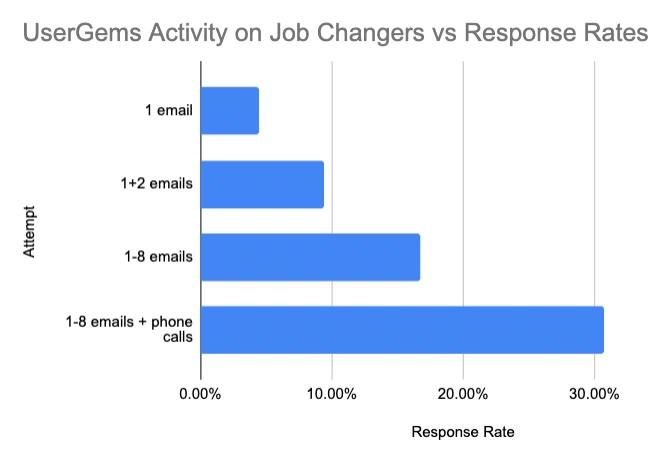
Outreach and SalesLoft recommend anywhere from 5-12 touchpoints, but adding even a third will increase your UserGems performance tremendously.
Your Customer Success Manager can also help your team automate their outreach to get the same success we’re experiencing at UserGems.
Boosting your lead response rate with UserGems
When pipeline is tight, you can't afford to waste time on leads that won't convert.
That’s why focusing on the leads who are most likely to buy is an efficient way of meeting revenue goals.
Respond fast and you close more deals. It's that simple.
Give your team a clear process. Show them why these leads matter. Automate the outreach. That's how you make sure every lead gets worked on time.
Join companies like Mimecast and Cobalt to 20x your pipeline generation ROI with UserGems.

.png)
.png)
.png)