UserGems MCP

Build and run campaigns in Claude or ChatGPT with UserGems MCP
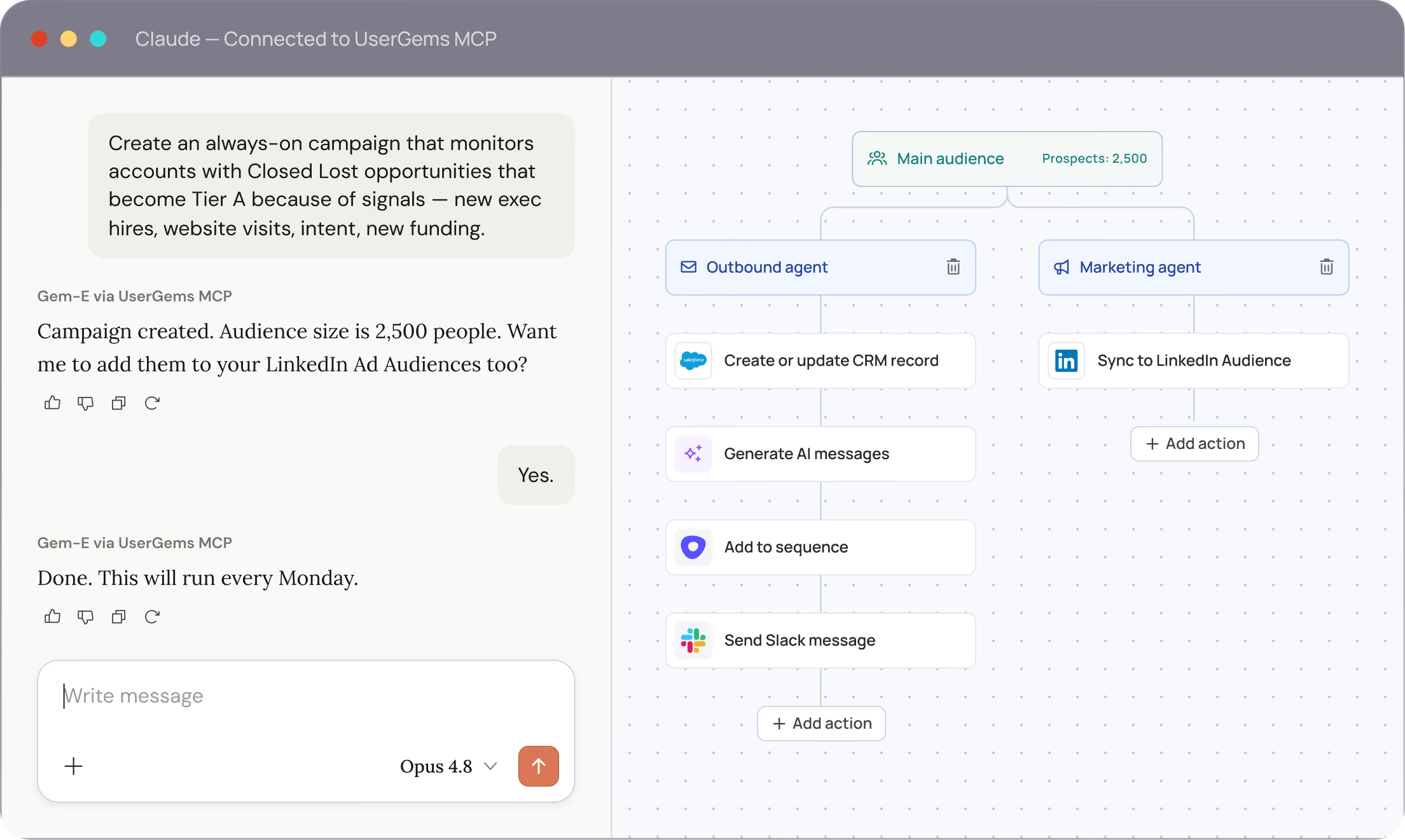

Build always-on signal-based campaigns. Build audiences, capture signals, orchestrate sales outreach and advertising audiences — just by prompting.
how it works

Three steps. Then just prompt.

UserGems MCP connects your AI to the brain powering your GTM. No engineering required.
step 1

Connect UserGems MCP to Claude or ChatGPT

Add UserGems as an MCP server in your AI of choice. One connection — works with any MCP-compatible interface.
step 2

Ask for what you need in plain language

Prompt your AI the way you'd ask a colleague. UserGems handles the research, scoring, and logic behind every response.
step 3

Your AI acts — not just answers

Campaigns built. Audiences synced. Sequences drafted. Every action grounded in live signals and your custom scoring model.
Copy & paste from Prompt Library →
BUY + BUILD

Buy the platform.
Build the differentiation.

The next era of GTM isn't just buying software or building from scratch — it's combining a proven intelligence platform with the flexibility to customize how you use it.
BUY

We handle everything end-to-end

Signals, scoring, enrichment, AI agents, and orchestration — all built and maintained by UserGems. Connect once and run outbound and ABM from your AI of choice, without building the infrastructure yourself.
Your AI is the interface. UserGems is the brain.
BUILD

Customize on top of the intelligence layer

Already building your own AI workflows? Use UserGems MCP to feed your homegrown model the signals, scored accounts, and enriched contacts it needs — without replacing what you've built.
Proven platform + your custom differentiation. Both at scale.
Why UserGems MCP is different
Not just another data lookup.
Most MCPs give your AI raw facts. UserGems MCP gives it the intelligence to act.
acts, not just reads
Most GTM MCPs return data (eg, a phone number, an email address, a location). UserGems MCP executes — build a campaign, create an ad audience, enroll contacts into a sequence, and guides you to the next steps.
vs. read-only data MCPs, you still have to figure out what to do with the data yourself
ACCESS GEM-E intelligence
Your AI gets scored accounts, prioritized contacts, fresh buying signals, and ICP context - already based on your own sales history - without having to build from scratch.
vs. field-level data APIs, AI reasons without scoring or signals
CONNECT MULTIPLE AGENTS
[Coming soon] Connect any MCP-compatible tool. UserGems agents call them mid-workflow — pull transcripts, match case studies, trigger gifts — all from one prompt.
vs. single-tool MCPs, no orchestration, no context sharing across tools
sales & marketing TOGETHER
SDRs ask for sequences. Demand gen asks for ad audiences. Both get intelligence grounded in the same 'brain', so sales and marketing finally work from the same source of truth.
vs. SDR-only tools, marketing teams still building audiences manually
use cases

What your team can do today

Every prompt runs on live UserGems data — signals, scores, and your CRM history.
Set it once. It runs every week.
An always-on campaign targeting past champions at new ICP accounts. Gem-E detects movements, creates records in Salesforce, writes personalized outreach, enrolls contacts in sequence, and triggers a Sendoso gift for the highest-score contacts — every Monday, automatically.
Setup prompt — run once, works forever
"Create an always-on campaign targeting past champions at new ICP accounts. Run every Monday. Enrich or create records in Salesforce. Write personalized 5-email outreach and add them to the Past Champion sequence in Outreach. Trigger a personalized gift via Sendoso MCP for any contact with a score above 85."
What the campaign does each run
Detect past champion movements at ICP accounts
Enrich or create records in Salesforce
Write personalized 5-email outreach
Add to Past Champion sequence in Outreach
Sync to LinkedIn ad audience
Sendoso MCP — trigger gift for contacts scoring 85+
Your closed-lost accounts, on autopilot.
Monitors closed-lost accounts and acts when they become Tier A — triggered by signals like new exec hires, website visits, intent, or new funding. Pulls call transcripts from Gong, fetches the right customer story from Webflow, and runs the full workflow automatically.
Setup prompt — run once, works forever
"Create an always-on campaign that monitors accounts with Closed Lost opportunities that become Tier A because of signals — new exec hires, website visits, intent, new funding. Pull call transcripts from Gong and fetch the right customer story from our Webflow CMS. Create and enrich missing contacts at the account. Draft personalized emails using that context and signals. Add them to the Revive Closed-Lost sequence in Outreach."
What the campaign does each run
Monitor closed-lost accounts for Tier A signals
Gong MCP — pull past call transcripts
Webflow MCP — fetch matching customer story
Create and enrich missing contacts at the account
Draft personalized emails using signals + context
Add to Revive Closed-Lost sequence in Outreach
Sync to retargeting ad audience
Your ABM audience, always current.
A monthly campaign that re-scores your top 300 target accounts, refreshes LinkedIn and Google audiences with who's in-market now, enrolls newly qualified accounts into your ABM sequence, and Slacks your team when the list is ready.
Setup prompt — run once, works forever
"Build a monthly ABM campaign for our top 300 target accounts. Every month: re-score accounts using buying signals and ICP fit, refresh our LinkedIn and Google ad audiences with the updated list, enroll newly qualified accounts into the ABM email sequence, and send a Slack alert to the marketing channel when the list is ready."
What the campaign does each run
Re-score top 300 accounts using signals + ICP fit
Refresh LinkedIn + Google ad audiences
Enroll newly qualified accounts into ABM sequence
Slack alert to marketing channel when list is ready
use cases

Connects once. Orchestrates everywhere.

UserGems MCP works with any MCP-compatible AI interface, and accepts inbound connections from your existing GTM tools.
AI interfaceS: where you'll prompt from
Claude icon
Claude
Connect directly from Claude via MCP.
chatGPT icon
ChatGPT
Works with GPT-4o and compatible chat interfaces.
Connected MCPs: tools Gem-E can call mid-workflow
Gong icon
Gong MCP
Pull call transcripts to informresearch and messaging
Webflow icon
Webflow MCP
Fetch the right case study orguide per account from your CMS
Claude icon
Sendoso MCP
Trigger personalized gifts mid-campaign, per recipient
Bring your own
Any MCP-compatible tool can bewired into a workflow

Your questions, answered.

What is MCP in simple terms?

MCP (Model Context Protocol) is an open standard for connecting AI tools to other systems. UserGems MCP is our headless interface — it exposes the full command center to whatever AI interface your team already prompts from, like Claude or ChatGPT. Instead of clicking through the UI, you ask, and UserGems does the work behind the scenes.

Who is the UserGems MCP for — reps, admins, or both?

Both, and yes. Your UserGems profile controls it: reps get rep tools, admins get everything. Campaign creation and editing are admin-only.

When should I use the MCP versus the UserGems app?

Use the MCP for quick answers. Research an account before a call, rank who to reach, pull signal history, draft a message. This is where most reps will spend their time.

Build campaigns and audiences wherever you prefer. Set up a full campaign conversationally — audience, actions, messaging, sending controls — or build it in UserGems. Same result either way, and UserGems runs the campaign once it's live. Admins also use the MCP to make one change across many campaigns at once, which beats doing it screen by screen.

Combine UserGems with your other tools. Connect UserGems alongside your other MCPs to assemble one view of an account from every system you use. It works both directions — UserGems can also call your tools during a campaign so outside data feeds your messaging.

When should I use UserGems MCP vs. API?

Both work. They're built for different jobs.

The API is for machines. You push first-party data in from your own systems on a schedule, it lands as a Custom Signal, and it runs the same way every time without anyone watching. It takes engineering time to set up, and there's no extra cost to use it.

UserGems MCP is for people and agents. Ask about an account, surface your hottest prospects, research someone you've never touched, build a campaign, change messaging across campaigns at once. No engineering, and you work in whatever AI tool you already have open.

Rule of thumb: if it should run on a schedule with nobody watching, use the API. If a person is deciding something in the moment, use the MCP.

How do I see which UserGems tools (ie, capabilities) I have available?

Ask "What UserGems tools do you have available?" in a new chat. You'll get the list you have access to, which depends on your UserGems permissions. Full list here: https://help.usergems.com/article/usergems-mcp-faq

I have more questions. Where can I find answers?

Check out this help article: https://help.usergems.com/article/usergems-mcp-faq